Most businesses count stock once or twice a year. Buying scanners for that
means they sit in a cupboard for eleven months and the batteries are flat when you next
want them. Hire ours instead, count, send them back.
Six is not six in stock with more out the
back. Six is what exists, so two counts in the same week will collide. Tell us your dates
early and we will hold them.
What we hire, and what we do not
This is a small, specific offer.
Said plainly at the top, because a page headed "rentals" usually
means a warehouse full of equipment and this one does not.
We do
Six Zebra TC8000s, for a stocktake
Take one or take all six, for a day up to a week. They arrive configured for
your site, with charging cradles and spare batteries, and they go back in the same
case afterwards.
Usually they run
Stocktakes Online, our own counting software,
charged separately and per count. But you can bring your own — a telnet
client into your ERP, or another Android app — and hire the six as plain
hardware. Read the note below first if you do.
We do not
Run a general hire fleet
No printers by the month, no scanners to cover a repair, no long-term hire. We used
to, and one day we may again, but today the honest answer is that there is no shelf
of equipment waiting.
If that is what you need, ring anyway. We would rather point
you somewhere useful than pretend.
And you do not have to hire anything. Stocktakes Online runs on your own Zebra
Android devices if you have them — if the fleet on your floor already scans, it
will count. Hiring is for the businesses that do not own scanners and should not have
to buy six to use them twice a year.
So it goes both ways: our software on your devices, or
your software on our devices, or both from us. The only combination that needs
checking first is the middle one, and the next section says why.
Why six is a small number and we say so
We used to run fifty.
From 2008 to 2024 there were more than fifty devices out on hire at any one time
— Symbol and Motorola MC9100s and MC9200s, running our own inventory software, in
warehouses all over the country. Staging them, repairing them, swapping a dead one out
mid-count and keeping a Windows Mobile fleet alive years after Zebra had ended it.
That fleet is gone. We were eight years late to Android
and it cost us customers, which is a story told properly on the
Windows Mobile page rather than glossed over
here. What replaced it is six scanners and a rebuilt piece of software, and it is
deliberately smaller while it earns its way back.
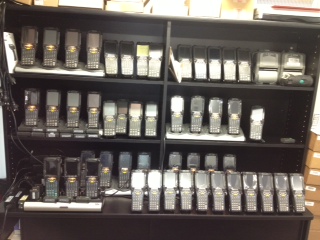
The fleet on charge, some time around its peak. Symbol and Motorola
MC9000 series in cradles, three shelves of them, waiting to go out to a count.
The photograph is 320 × 240, which is the size photographs were
when it was taken. We have not blown it up to make it look better than it is.
The sixteen years is why the six work. Anybody can put
scanners on a shelf. Knowing what to send with them, what breaks, what an operator will
do to a device on day three, and how to have a spare battery in the right hand at the
right moment — that is the part you are actually hiring.
What turns up
Set up before it reaches you.
A scanner that arrives needing to be configured is a scanner that
costs you the first morning of the count.
01
Configured for your site
Wifi joined, the scanner profile set, the app installed and pointed at your
portal, and your company and site already on the login screen. An operator signs
in and starts counting.
02
Charging and spare batteries, in the rate
Two four-bay cradles go out with the fleet — eight bays for six devices, so
everything charges overnight with two to spare, and each cradle charges spare
batteries beside the scanners. A device that goes flat halfway down a bay is a ten
second battery change rather than a walk back to a bench.
03
Your data already loaded
Parts and bin locations on the portal before the devices arrive, so the
first scan of the day resolves to a description instead of an error. If your files
need work we will say so and quote it rather than discover it on the morning.
04
Back in the same case
They go home the way they came. Fair wear is expected — these are warehouse
devices and they have been in warehouses. Damage beyond that, or a device that does
not come back, is quoted at what it costs to replace.
And the honest bit about the hardware. These are 2015 TC8000s. Zebra
stopped selling them years ago and we would not sell you one — but you are not
buying it, you are counting with it for a few days, and it runs the current
Stocktakes Online app exactly as a new device does, because the app was built to.
If you are bringing your own software, this is the sentence
that matters: the TC8000 runs Android 5.1.1 and cannot be upgraded. A telnet or
terminal emulation client into your ERP will be perfectly happy — that is the
work these devices were designed for. A modern Android app very likely will not
install at all, because most now require a far newer version. Check before you book,
not on the morning of the count, and if you are not sure, send us the app and we will
try it on one.
As the fleet is replaced these will be newer machines and that
limit goes with them. The hire rate is for a working scanner set up for your site,
whichever model that turns out to be.
Rates
Priced per device, per day or per week.
A day rate and a week rate, per device, with charging and spare batteries included, and
the option to take one scanner or all six. The counting software is separate and sold per
count rather than per year.
The numbers live on one page rather than two. They are on
the Stocktakes Online site alongside the software pricing they go with — which is
the only way to be sure the two agree, and the same reason
repair rates live on one page here.
That is the whole booking. Six devices and a calendar — tell us the week and we
will hold them, or tell us honestly that somebody else already has them and you should
pick another date.