BARCODE DATALINK Since 1991
Zebra Android · mobile computers

The scanner is the easy part.

A mobile computer is not really a device you buy. It is a device somebody holds for eight hours while it opens a session into the system you already run — and whether that goes well is decided long before the box arrives.

We sell a lot of scanners, into shops and offices and everywhere else, and a scanner is a box that goes in a courier bag. This is the other thing. Mobile data capture in the warehouse is what this business has been built around for thirty-five years — since 1991, through Symbol, then Motorola, now Zebra. Racking, docks, freezers and yards. Getting a device talking to somebody else's software, making the screen fit the job, and still answering the phone about it four years later.

What it has to talk to

Your system, not ours.

Pronto. SAP. Manhattan Scale. JD Edwards. Or something written for you fifteen years ago that everybody still relies on and nobody wants to touch.

The device is a terminal into that. It opens a session, puts a screen in front of a picker, takes keystrokes and scans, and sends them back. So the questions that decide whether it works are about the session rather than the hardware: how many fields on a line, how many keystrokes to confirm one, whether the operator is wearing gloves, whether the screen shows enough of the form to avoid scrolling on every transaction.

Get that right and a picker stops thinking about the device. Get it wrong and they think about it four thousand times a shift.

Before you choose

Three things decide it, and none of them is the badge.

Every one is a fact about your software, your building or your racking. None can be read off a spec sheet, and all three cost money every day if they are wrong.

01

The keypad, decided by your software

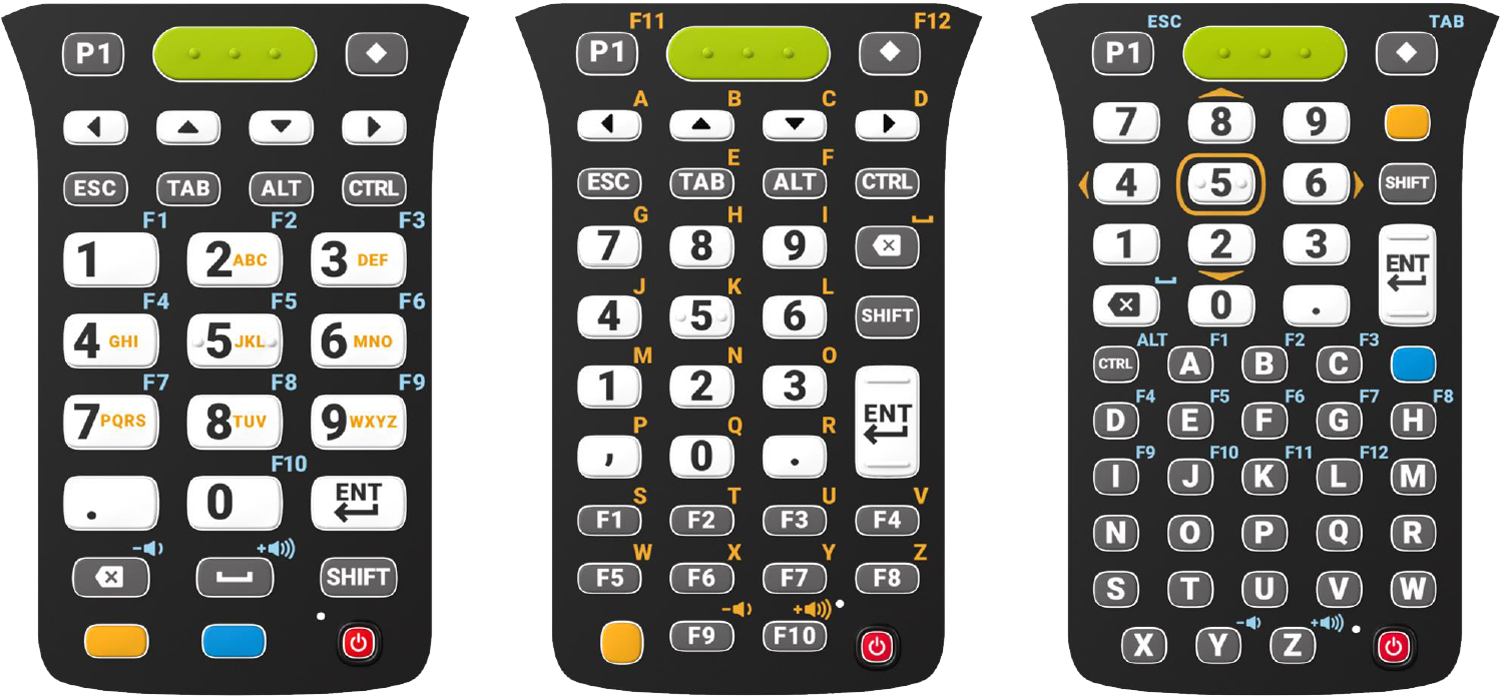
A worked example. Running Pronto, we would sell you the 38-key rather than the 47-key — because Pronto's function keys sit along the bottom of the 38-key layout, one press away. On the 47-key you press FUNC and then a number. Two presses instead of one, on every transaction, all day.

Neither data sheet tells you that. It comes from having fitted both.

02

The room it lives in

Cold storage is its own problem. A device carried between a freezer and a loading dock fogs, then condenses, then fails — so the MC9400 has a freezer configuration built for that cycle. If any part of the run is below zero, this decision gets made before any other.

03

How far the barcode is

Both the MC3400 and the MC9400 come with extended range 2D scanning, for labels high in the racking or across an aisle. The alternative is somebody on a ladder, or a forklift repositioned to get close enough — which is slower, and the reason people replace scanners that were never the problem.

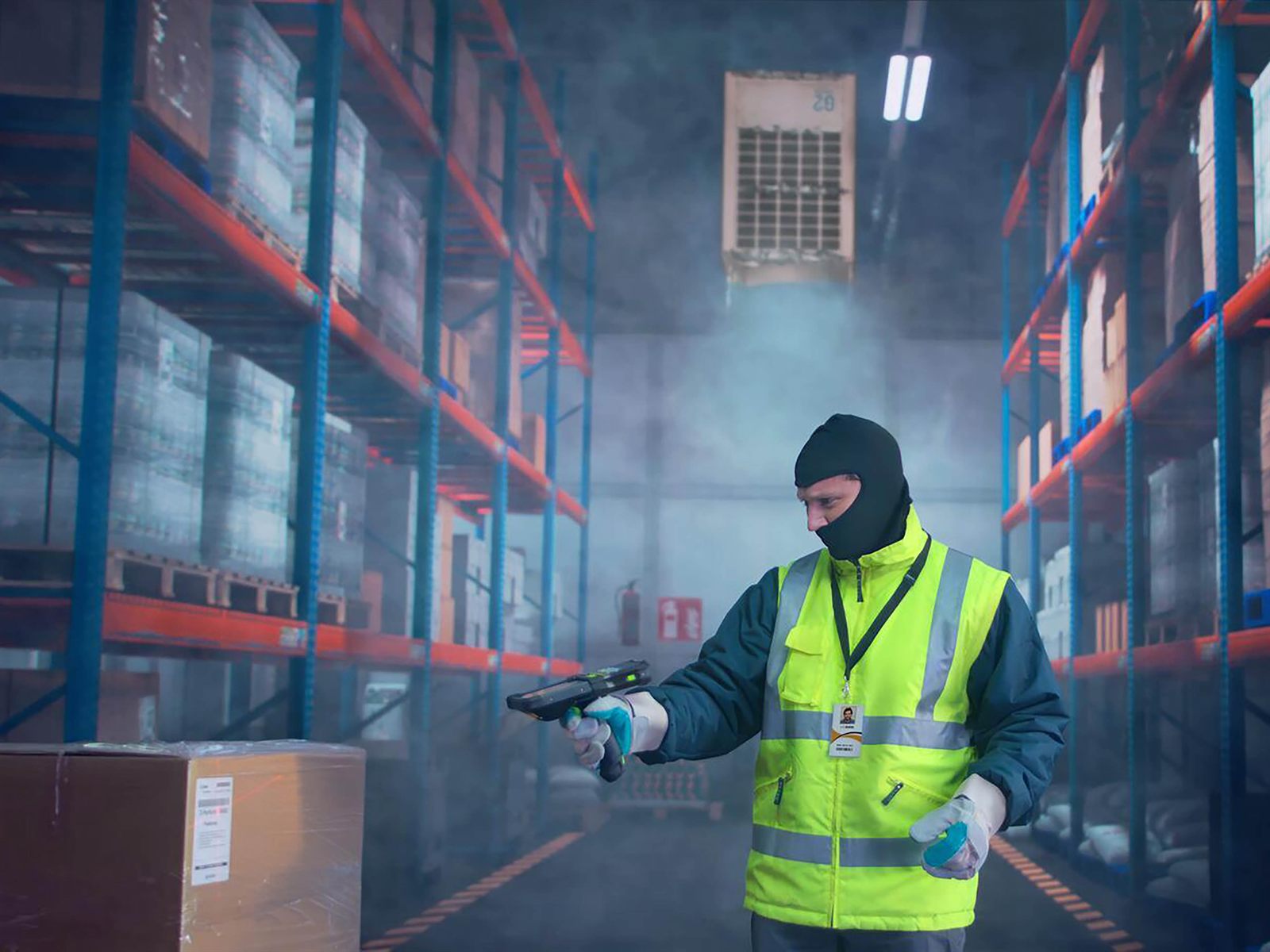
An operator in a freezer jacket, balaclava and thermal gloves standing in a
                    cold store aisle with fog hanging under the evaporator, scanning with a
                    gun-grip Zebra MC9400.
Decision 02, in a cold store. Gloves on, breath in the air, and a device carried out to a dock at ambient twenty minutes later. That cycle is what the freezer configuration is built for, and it is why the room gets decided before the keypad does.
A worker in a hard hat and hi-vis vest in a container yard, aiming a gun-grip
                    Zebra MC9400 upward at a label on a stacked shipping container while holding a
                    clipboard in the other hand.
Decision 03, in a yard. He is not walking over and he is not on a ladder. That is the whole case for extended range — the scan happens from where the person already is.
The three MC3400 keypad layouts side by side: numeric 29-key, function/numeric
                  38-key with a row of F1 to F10 keys along the bottom, and alpha numeric 47-key
                  with a full letter keyboard.
The same device, three keypads — 29, 38 and 47, left to right. Look at the middle one: F1 to F10 are real keys along the bottom of the 38-key layout. On the 47-key on the right they are the small blue legends above the letters, reached with FUNC and then a number. That is the difference between one press and two, on every line of every pick, and it is decided by the software you already run rather than by the device.

On the MC3400 the keypad is fitted at the factory and stays there. You choose 29, 38 or 47 when you order, and that is the device for the rest of its life — there is no swapping it on the bench, let alone on the floor. Order fifty with the wrong layout and you have fifty of the wrong device.

The MC9400 is the exception: its keypads are field-interchangeable. If the software changes, or the job does, the keypad comes off and another goes on without the device leaving the building. That flexibility is part of what you are paying the difference for, and it is worth knowing before you commit a fleet to a layout.

Two sites, same year

Opposite answers, and both are right.

Two New South Wales warehouses fitted out of the same Zebra range. They ended up specified differently on two of the three decisions above — not because one of them got it wrong, but because they run different software and count different racking.

Running Manhattan Scale

MC3400-ER, 47-key

A large distribution centre. Extended range, because the labels are high and an operator on a ladder is an operator not picking. 47-key, because that is what their software wanted.

They came off MC9200s running Windows Mobile 6.x, by way of the Android MC3300-ER. The move was decided on size and weight as much as anything — a lighter device with a screen big enough to be worth looking at, held for a whole shift.

Running Pronto

MC3400-2D, 38-key

A picking operation. Standard 2D imager rather than extended range, because the stock is within reach and paying for distance nobody needs is just paying. 38-key, for the reason above — Pronto's function keys land on the bottom row, one press instead of two.

Same range, same era, and a different machine on the shelf. That is the whole argument for having the conversation before quoting.

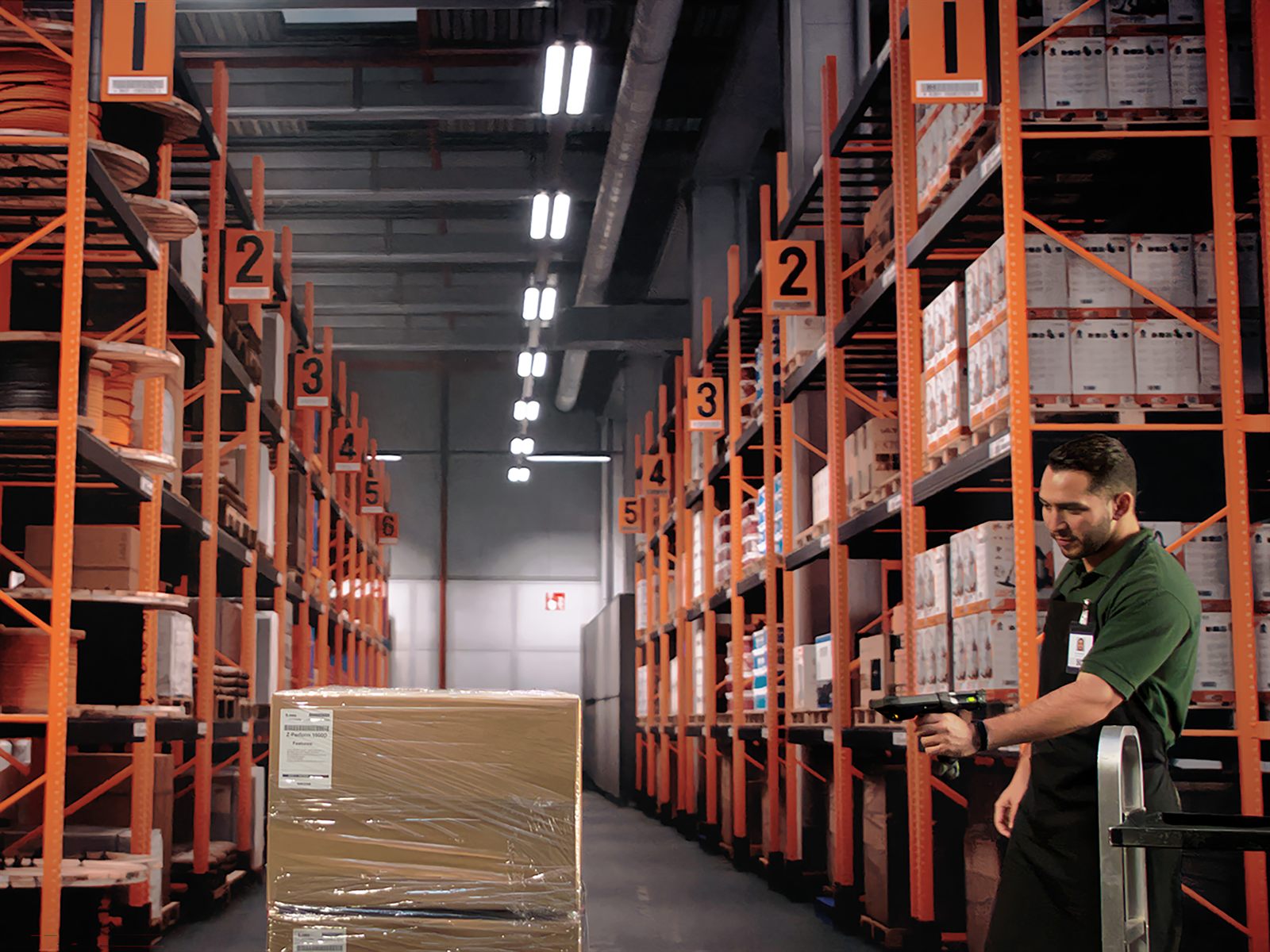
A long warehouse aisle with orange racking, numbered bay labels running away
                  into the distance, and an operator at the far end scanning with a gun-grip
                  Zebra device beside a wrapped pallet.
The bay numbers running away down that aisle are the question in one picture. How far is the furthest label you actually have to read, and how high? Answer that on your own racking and the extended-range decision makes itself — which is the difference between the two sites above.
The range

Two shapes, and the honest difference between them.

Zebra makes a great deal more than this. These are the two that go into Australian warehouses and stay there — both gun grip, both with a real keypad, and separated by how hard a life the device is going to have.

Gun grip

MC3400

Pistol grip and a real keypad, in 38-key and 47-key layouts — which is where the Pronto decision above lands. Extended range available. The usual answer for racking work, where somebody scans all day and types quantities.

Heavy duty

MC9400

The one that survives what the others do not, and the only one here with a freezer configuration. Extended range available, and the keypad can be changed in the field. Bought for cold storage, hard drops, and sites where a failed device stops a shift rather than a person.

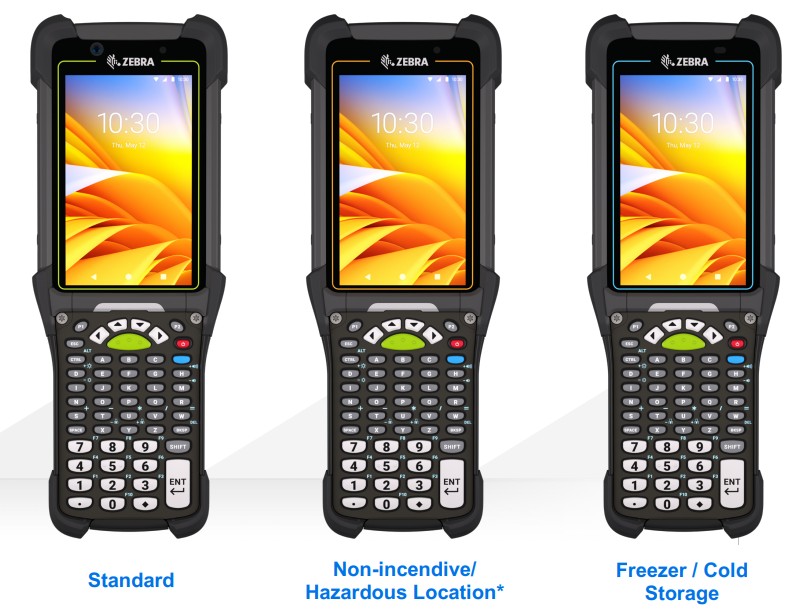
Three Zebra MC9400 units side by side, identical apart from the colour of the
                  bezel around the screen: green for standard, orange for non-incendive
                  hazardous location, and blue for freezer and cold storage.
Three builds of the same machine, and from the front the only tell is the colour around the screen. Green is standard. Blue is freezer and cold storage. Orange is non-incendive, for hazardous locations — and Zebra sells that one in North America only, so it is on this picture but not on our price list. The difference between the other two is a heated window, a heated touch panel and a freezer-rated battery, none of which shows in a photograph — so the part number matters more here than on anything else on this page.

There is more than this, and it is worth a phone call rather than a longer page. The touch computersTC22, TC5x, TC7x, TC2x, TC1x and the EM45 — where a screen and no physical keypad suits the job better, and the lighter-duty MC2200 and MC2700 where the work does not warrant an MC3400. Wearables — a ring scanner and a wrist terminal — when both hands are needed for the stock and not the device. Forklift and vehicle mounts, for a driver who should not be holding anything. And RFID, for the day the question stops being "which barcode" and becomes "what is on that pallet without unwrapping it" — which we put together with Zebra and other Zebra partners rather than on our own, and which always starts with a conversation rather than a quote.

We have deliberately not listed these out. Adding another twelve tiles would make this page longer without making the decision any easier — and the decision is the thing. Describe the job on the phone and the shortlist gets to three in about ten minutes.

How we specify

Three problems we hear, and what we do about them.

Nobody rings up wanting a scan engine. They ring up because something on the floor is costing them, usually every day, usually for years. These are the three we hear most, and the answer to each is a decision rather than a device.

“Someone is always up a ladder”

The label is high in the racking, or across an aisle, or on a container three rows back. So a person walks over, or climbs, or moves a forklift to get close enough. It reads as normal because it has always been normal, and it is quietly the most expensive habit in the building.

The fix is read distance, and it is worth knowing what is actually available before anyone spends money on it: an MC9400 reads a barcode up to 30 metres away, held in the hand. What we ask on the phone is how far the furthest label you genuinely have to read is, and how high — because if the answer is four metres, extended range is money you do not need to spend, and we will say so.

“They work fine until they come out of the freezer”

This one has a signature. The device behaves perfectly in the cold store, then goes to a dock at ambient, fogs over, and somebody wipes the screen on their sleeve to read it. Over a year the condensation gets inside and the failures start arriving in threes.

The answer is not a tougher device, it is a different build — a heated touch panel, a heated scanner window and a battery rated for the cold, so the machine never reaches the temperature where water forms on it. What we need from you is the whole journey, not the coldest number: where the device starts, where it ends, and how many times a shift it crosses between them. That is the question that decides it, and it is not on any spec sheet.

“We ordered fifty and the keypad is wrong”

The worst version of this call comes six weeks after delivery, when the operators have stopped complaining and started working around it. On most devices the keypad is fitted at the factory, so there is nothing to be done: fifty wrong devices stay wrong for their whole working life.

Which is why we would rather have the conversation about your software first — and why, on a fleet where the work might change, we will point out that the MC9400's keypads come off in the field and most others do not. That is not a feature we are selling you. It is insurance against a decision nobody can make perfectly in advance.

None of this makes the dearest device the right one. Half the time the conversation ends with a cheaper machine than the one that was asked for, because the racking is low, the room is ambient and the software wants a numeric keypad. Thirty-five years of fitting these has mostly taught us which questions change the answer — and the answer is often that you already have what you need.
Pricing

Why there is no price on this page.

Because the configuration is the decision, and nobody has asked you yet. A 38-key and a 47-key MC3400 cost about the same, and one of them will irritate your pickers for five years. A freezer MC9400 and a standard one are different machines at different prices. Extended range or standard changes the price and whether anybody needs a ladder. A number on this page would be the price of a device nobody has established you should buy.

Our own Stocktakes Online site does publish prices for some of this hardware, and that is not a contradiction. There it is one kit doing one job, so the configuration is already settled and a fixed price is the honest thing to show. Here it is not settled, and pretending otherwise would cost you more than it saved.

Before it ships

Staged, not just supplied

A device out of the box has no network, no session and no software. We set them up before they leave — network, scan settings, the client that talks to your system, and whatever locks the thing down so a picker cannot wander off into the browser. Ten devices configured once is an afternoon. Ten devices configured on the floor, one at a time, is a fortnight.

Still on the old fleet?

Windows Mobile and Windows CE

MC3100s, MC9100s and the rest are long out of support, and the replacement question is usually less about hardware than about what the old fleet is quietly holding up. We ran one ourselves until the end of 2024, so this is not a lecture about somebody else's migration.

Still running Windows Mobile? →

Start the conversation

Tell us what it has to plug into.

Less a quote request than the first few questions we would ask on the phone. Answer what you know and leave the rest.

Or ring 0414 53 53 95

Counting stock rather than running a warehouse?

Then you may not need any of this. Stocktakes Online is our own system for exactly that job, on the same Zebra hardware, and priced per stocktake rather than per year.

Stocktakes Online