BARCODE DATALINK Since 1991

Home/Printers/ZT411

Industrial printer · 4 inch · ribbon or no ribbon

Zebra ZT411

An industrial machine printing a desktop-sized label. Four inches wide, the same metal frame and colour touch display as the ZT421, and built to run all day on a roll that lasts a shift. Narrower does not mean lesser here — this is the faster of the two and it takes options the six inch machine cannot.

Three part numbers today and more coming. Two of them cost exactly the same and solve completely different problems, which is the thing worth reading before you order.

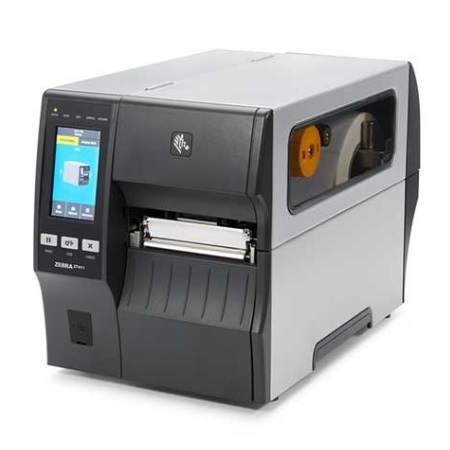
Zebra ZT411 industrial label printer with the media cover open, showing the ribbon spindle and the media path, beside a colour touch display.
3 versions of this printer, from $2,298. Part numbers and prices are in the table below.
Why this one

Two of these cost the same.

The base machine is $2,298. The other two are both $3,299 — the same $1,001 more, for two upgrades that have nothing to do with each other. Buying the wrong one is easy and it is not obvious afterwards.

01

The base — USB, Ethernet, serial and Bluetooth

A printer on the network that a system prints to, or on a cable to one PC. For most warehouse label work this is the whole answer, and the two upgrades below are for specific problems rather than general improvement.

02

Peel with full rewind, for a labelling line

Separates the label from its backing as it prints and winds the liner up inside, so an operator takes a label ready to apply instead of peeling it first. Worth the money where somebody labels a carton every few seconds. Zebra fits this at the factory only, so unlike the wireless option it cannot be added later.

03

Wireless, for a printer that has to move

Same $1,001, entirely different reason. This is for a bench that moves, a mezzanine nobody wants to run cable to, or a site where the network points are already spoken for. It does nothing for how the label comes out — and peel and rewind does nothing for where the printer can sit.

04

And this is only where it starts

Three part numbers are priced above; the ZT411 is ordered from a wider list than that. Resolution comes in 203, 300 or 600 dpi. Wireless comes in two generations — Wi-Fi 6 with Bluetooth 5.3, or Wi-Fi 5 with Bluetooth 4.2 — and which one you want depends on the access points you already have rather than on the printer. Media handling is a peeler, a cutter, a liner take-up, or full rewind, and they are not the same thing: a cutter separates labels, a peeler presents one ready to apply, and the take-up and rewind decide what happens to the backing. Tell us the job and we will tell you the part number.

It runs both kinds of label. Like every industrial machine, this one does direct thermal and thermal transfer both — load a ribbon or do not, and the printer does not care. Buying it is not a commitment to buying ribbons forever. Which stock goes in it is decided by how long the label has to survive, and that is settled on the labels page, not here.

Four inches or six? That is the only question between this and the ZT421, and the answer is your widest label. What surprises people is that the narrower machine is the quicker one — 14 inches per second against 12 — and that several options are ZT411-only: a 600 dpi printhead, a 25 mm core hanger for small rolls, ink-side-in ribbons, and Zebra's on-metal RFID kit. If your labels fit in four inches, this is not the compromise.
What it costs

Part numbers and prices.

Australian dollars, including GST, excluding freight. Everything listed in the box is in the box — there is nothing else to buy to start printing, except labels and/or ribbons.
Zebra part number What is in the box Price inc GST
ZT41142-T0P0000Z Zebra ZT411 TT 4" 203DPI USB,10/100 Ethernet, Multi
USB Cable
Power cord
$2,298
ZT41142-T4P0000Z Zebra ZT411 TT 4" 203DPI USB, 10/100 Ethernet, Peel with Full Rewind
USB Cable
Power cord
$3,299
ZT41142-T0PC000Z Zebra ZT411 TT 4" 203DPI USB, 10/100 Ethernet, Multi Wifi
USB Cable
Power cord
$3,299

Warranty

1 year, return to base — the unit comes back to us for repair or replacement rather than somebody coming out to you. Warranty runs by model rather than by price, so it is worth checking against whatever else you are comparing.

01

Ask us before you count on it

Our distributor does not publish a stock figure for this printer — it is one to check rather than assume. Ring or email and we will have an answer the same day, usually within the hour. We would far rather tell you it is three weeks away than take an order we cannot fill.

02

The price is real either way

What is on this page is what you pay when it is available. Checking stock does not change the number, and it is not the opening of a negotiation.

03

Tell us the part number and how many

That is genuinely all we need. You get a written quote back with freight worked out to your actual address, because a printer to Parramatta and one to Port Hedland are not the same delivery and we would rather not pretend otherwise. A new account pays before it ships, and the clock starts when the payment confirms.

04

Been comparing online? Send us the quote

If you have a written quote from somebody else on the same part number, we will match it. No haggling required, and no need to pretend you have not been looking.

Not sure this is the right one?

Tell us what you are printing, and onto what. Thirty-five years of these conversations says the answer is usually simpler, and cheaper, than it looks from the inside.

Call 0414 53 53 95